Showing posts with label Linux. Show all posts

Thursday, August 30, 2012

Is Linux and Unix the same?

Well one question we all have faced when we are new to linux or open source is that: Is unix and linux the same? Is linux made from unix?


Well to answer that I've provided a link to a post which I found worth reading and which will answer this question. http://itcertificationindia.blogspot.in/2012/08/is-linux-unix-like-operating-system.html

:)

Saturday, June 9, 2012

How to to install dsl in a pendrive and booting it up from windows

Its really cool when we try out new things. Have you guys ever tried out to boot up an operating system from a pendrive while you are still working with windows? Its a cool thing to try out. You can do it within 5 minutes.

dsl sreenshot
The operating system we are using is Damn Small Linux(dsl) which is one of the smallest linux distribution in the world! It is around 50 mb. DSL is embedded with a feature called QEMU which enables the user to run an operating system in another one. By using the Universal Usb installer you can make a bootable usb of Damn Small Linux.


Here is a video tutorial on how to install dsl and booting it up from windows:


Links to essential softwares:


Saturday, April 9, 2011

How to install Fedora 14 Desktop Edition?


In this post i'll illustrate the installation of Fedora 14. Fedora is a open source, linux distribution. Fedora development is taken up by the Fedora Project and is funded by Red Hat Inc. So now lets install Fedora 14. I'm doing the installation in a virtual machine.(Anyway all installation is the same. It does not matter if your using a virtual machine or a physical machine) 
  1. First you need the Fedora 14 image or iso.(If u already have a dvd of Fedora 14, you don't have to download the image or iso) Click download Fedora to download the image. There are many edition of fedora available. The default Fedora 14 is the Fedora 14 Desktop Edition. If u want to download as a torrent click torrents. In this page there are a number of torrents select the Fedora 14 you want.

  2. After you have got the iso you need to burn it into a dvd or you can create a bootable pendrive.

  3. Then restart your computer and boot your system to the dvd or the pendrive. A menu would appear with a number of options.

  4. fedora Installation boot screen
    Select the option 'Install a new system or upgrade an existing system'. (After you have selected it a number of process would go on the screen) 


  5. Then you will be asked whether you want to test your install media. Its your wish. If you want to select 'ok' and if you want to skip press 'skip'.(If you select 'ok' you have to wait for a couple of minutes for the checking) This option is to check whether the iso is good for the installation and is there anything missing in the iso.

  6. Fedora 14
    Next A graphical screen with the Fedora logo and '14' is displayed. Click next.


  7. Select the language of installation and click next. 

  8. Select the appropriate keyboard and click next.

  9. In the next window select Basic Storage Devices and click next. (Specialised storage devices will not be needed by you until you use iSCSI,etc)

  10. Select your hostname : Fedora 14
    Next screen is where you give your hostname. You can also configure your network. After everything is done click next.

  11. In the next screen you can select the time zone of your place. After selecting the time zone click next.

  12. The next screen asks you to enter the password of root. Root is the user in linux operating systems who has access to all commands and files. Root is also called the superuser. Enter the password for root and click next.

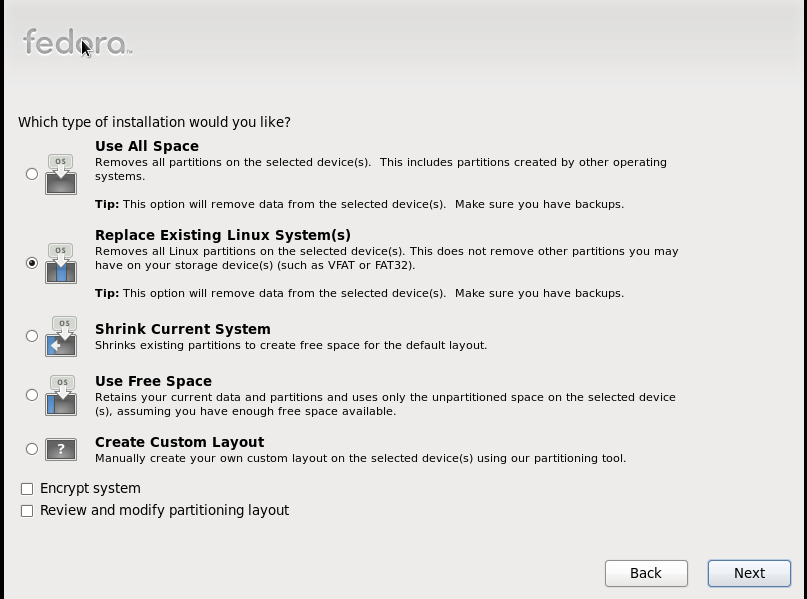
  13. Select type of Installation : fedora 14Next you will come to a screen with a number of options. This is where you select the type of installation you need. Select 'Use All Space' to remove all partitions in your system and create the default layout. There are also many other options. If you know to create partitions select 'Create Custom layout'. If your new to it its better to select other options. (Please read the description under each option and select the most suitable one)

  14. Select the softwares : fedora 14 In the next screen you can select the different softwares needed. There are two options at the bottom. One is 'Customise Later' which customises the softwares later and the other is 'Customise Now' where you can select the softwares needed for your system.(If you are a experienced user customise now option would do) Select the option and click next. If you have selected customise now you'll be taken to another screen where you can select the neccessary softwares needed.

  15. The next step is the installation. After selecting the packages and clicking next the system will check for dependencies. After the dependency check the installation will be started automatically.

  16. The installation takes several minutes. After the installation you will be asked to reboot and finally your Fedora 14 is ready!

Monday, March 28, 2011

Linux Distributions

There are numerous number of open source, linux based operating systems. In this post I have selected the a few of the most popular open source operating systems.


Red Hat enterprise Linux (RHEL) is developed by Red Hat Inc. It produces both servers and home desktops. Its newest version is the RHEL 6. RHEL is the leading server operating system.


Ubuntu

Ubuntu is a computer operating system developed by Canonical Ltd. It is owned my Mark Shuttleworth. It is the #1 in linux desktop. Its latest release is Ubuntu 10.10.


Debian

Debian is a computer operating system developed under the Debian Project. It uses the linux kernel. The latest release of Debian is 6.0 .


fedora-logo

Fedora is a operating system developed under the Fedora Project. It is sponsored by Red Hat Inc.It is also called "The testing bed of Linux". Its latest release is Fedora 14.


Linux Mint

Linux Mint is an operating system developed by the Linux Mint Team. It is based on Ubuntu and also Debian. Its latest version is Linux Mint 10.


centos

Centos is a operating system developed under the Centos Project. Centos stands for Community Enterprise Operating System. Centos operating system is famous for web server use. Its latest stable release in Centos 5.5.


There are a lots more out there. These are a few among them.

Introduction to Linux

Tux: Mascot of Linux
In this post lets answer to this question. What is linux? "I started using linux based operating system from the age of 11. Linux is a wonderful operating system". In simple terms it is an open source version of UNIX like operating system. The chief architect of the linux kernal is Linus Torvalds. It is developed as a part of the GNU Project. The official mascot of linux is called Tux which is a penguin. The development of linux became a great step in the development of open source technology.

The most famous linux based operating systems are Red Hat Linux, Ubuntu, etc. Linux systems have graphical interface. Linux has a reputation as a very efficient and fast-performing system. In today's world most of the servers are linux based. One of the most famous properties of linux operating systems is where it can be used. It can be used from wristwatches to supercomputers.

The advantages of Linux as a open source product ranges from benefits of creative inputs from people all over the world to efficient security. Another advantage is that it can be tested by anyone and the results of the testing helps in improving the quality of the operating system.These tasks are much more difficult in a closed system like the Microsoft Windows.

Microsoft Windows vs Linux

Linux based operating systems are entirely different from windows operating system in many aspects. For one, Linux is an open source based operating system. This means the source code of linux is publicaly available for inspection and improvement. This is one of the main differences. Another difference is between the number of versions available. Microsoft is the only company producing windows operating system while there are numerous number of companies like Red Hat, Ubuntu, Debian, etc producing linux operating systems. A person who decides to install linux on his/her computer have a wide range of operating system to choose from.

Linux is an entirely new dimension of operating systems. As i said it is a wonderful operating system. So grab it!